NO.66 HOTSPOT
You have an Azure SQL database named db1.
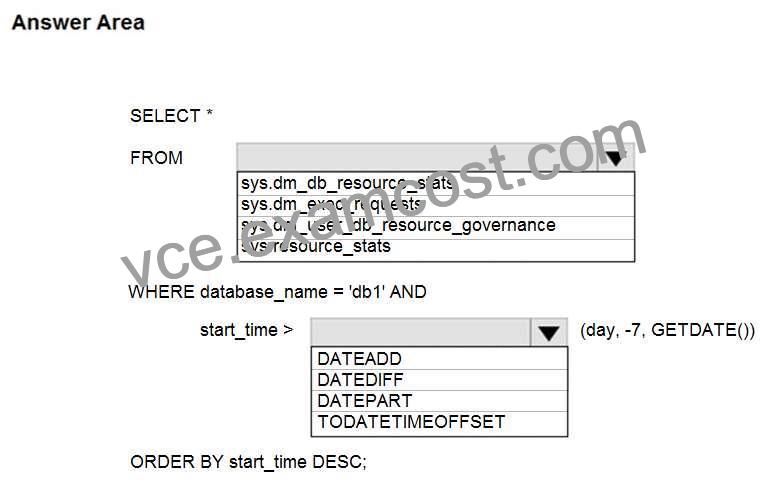
You need to retrieve the resource usage of db1 from the last week.
How should you complete the statement? To answer, select the appropriate options in the answer area.
NOTE: Each correct selection is worth one point.
Hot Area:
Section: [none]
Explanation:
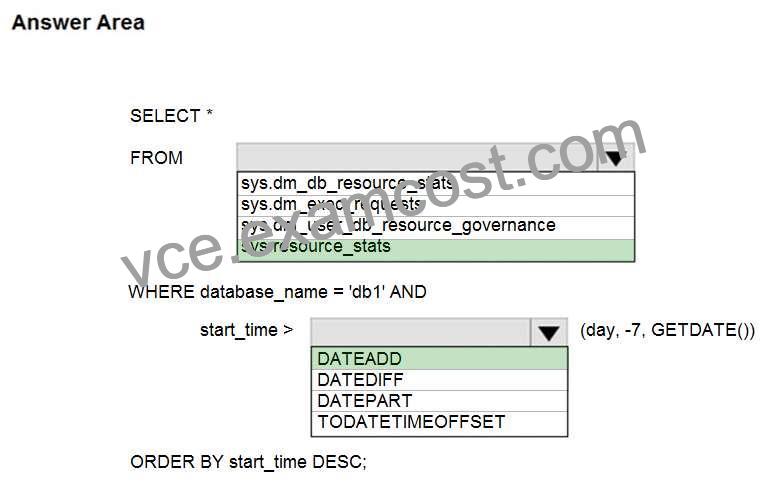
Box 1: sys.resource_stats
sys.resource_stats returns CPU usage and storage data for an Azure SQL Database. It has database_name
and start_time columns.
Box 2: DateAdd
The following example returns all databases that are averaging at least 80% of compute utilization over the last
one week.
DECLARE @s datetime;
DECLARE @e datetime;
SET @s= DateAdd(d,-7,GetUTCDate());
SET @e= GETUTCDATE();
SELECT database_name, AVG(avg_cpu_percent) AS Average_Compute_Utilization
FROM sys.resource_stats
WHERE start_time BETWEEN @s AND @e
GROUP BY database_name
HAVING AVG(avg_cpu_percent) >= 80
Incorrect Answers:
sys.dm_exec_requests:
sys.dm_exec_requests returns information about each request that is executing in SQL Server. It does not
have a column named database_name.
sys.dm_db_resource_stats:
sys.dm_db_resource_stats does not have any start_time column.
Note: sys.dm_db_resource_stats returns CPU, I/O, and memory consumption for an Azure SQL Database
database. One row exists for every 15 seconds, even if there is no activity in the database. Historical data is
maintained for approximately one hour.
Sys.dm_user_db_resource_governance returns actual configuration and capacity settings used by resource
governance mechanisms in the current database or elastic pool. It does not have any start_time column.
Reference:
https://docs.microsoft.com/en-us/sql/relational-databases/system-catalog-views/sys-resource-stats-azure-sql-
database


